
- How to log in to DAZN Bet
- Which email address and password to use
- Check your details before submitting
- DAZN Bet login on desktop and mobile
- Sign in through a desktop or mobile browser
- Sign in through the DAZN Bet app
- Reset a forgotten DAZN Bet password
- What to check if the recovery email has not arrived
- What to do if password recovery does not complete
- Recover a forgotten login email
- Identify the account email before resetting your password
- Get help when you cannot identify the email
- Troubleshoot DAZN Bet login problems
- The sign-in form does not load or respond
- Saved credentials keep causing an unsuccessful login
- The mobile app has a technical problem
- DAZN streaming accounts and DAZN Bet login
- Change your password after signing in
- Keep your account credentials private
- Contact support about a login problem
- What to include in your support request
- Chat does not open in Firefox private browsing
How to log in to DAZN Bet
To log in to DAZN Bet, open the official website, select the sign-in option and enter your registered email address and password. Your email address is your DAZN Bet username, so use the address associated with your betting account.
If you already have an account, go straight to sign-in. Registration is for creating an account, while password recovery helps you regain access to an existing one.
- Open the DAZN Bet website.
- Open the sign-in form.
- Enter the email address registered with DAZN Bet.
- Enter your account password.
- Submit the form to access your account.
If the form rejects your details, check the email and password before trying again. A typing mistake, an old saved password or an email address belonging to a different account can prevent you from signing in.
Which email address and password to use
Use the credentials for your DAZN Bet account. The username field refers to your registered email address, rather than a separate nickname or display name.
DAZN Bet registration is separate from DAZN streaming registration. Having access to the streaming service does not by itself mean that you have created a betting account. If you use both services, check that your password manager is entering the details saved for DAZN Bet.
Check your details before submitting
Before resetting anything, inspect the details you have entered. Check the full email address, including its spelling and domain. Remove accidental spaces introduced when copying and pasting.
For the password, check whether Caps Lock is enabled and whether your device has inserted an older saved entry. Entering your credentials manually once can help distinguish an autofill problem from a forgotten password. If you cannot remember the password, use recovery instead of repeatedly guessing.
DAZN Bet login on desktop and mobile
You can approach account access through the DAZN Bet website or its mobile app. Choose the route you normally use, then open the sign-in form and enter your betting-account credentials.
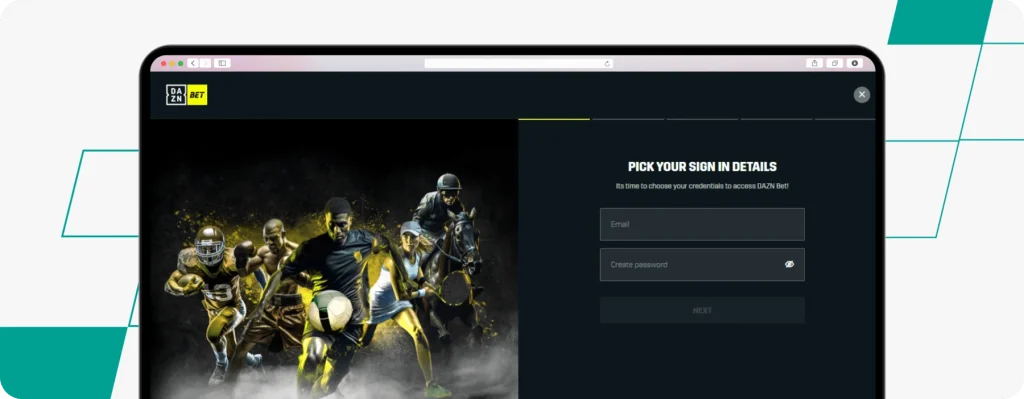
Keep the type of problem in mind. A rejected password calls for a credentials check or password reset. A form that does not load needs technical troubleshooting. Reinstalling an app will not correct a forgotten password, just as resetting a password will not necessarily resolve a browser loading problem.
Sign in through a desktop or mobile browser
Open DAZN Bet in your browser and use the website’s sign-in option. On a phone, take care when entering your email address and password: keyboard suggestions, capitalisation and saved details can introduce mistakes.
If the browser fills in the form automatically, review the email address before submitting it. After a password reset, the saved password may still be the previous one. Update the saved entry once you have successfully signed in with the replacement.
When the form is unresponsive or the page does not load properly, follow the browser troubleshooting steps below. Focus on the technical issue before changing account details that you already know are correct.
Sign in through the DAZN Bet app
Open the DAZN Bet app, access its sign-in form and enter the email address and password for your account. If you have recently changed your password, use the new one when signing in through the app.
If the app reports a credentials problem, check the details or use password recovery. If it has a technical problem that prevents you from reaching or using the form, follow the app troubleshooting steps. Keep your registered email and password available before reinstalling, as you may need to enter them again afterwards.
Reset a forgotten DAZN Bet password
You can reset a forgotten password from the DAZN Bet sign-in form. The recovery process sends a link to the email address registered with your account, allowing you to create a replacement password.
You do not need to create another account to replace a forgotten password. Start with recovery and use the same registered email address.
- Open the sign-in form on DAZN Bet.
- Select the forgotten-password option.
- Enter your registered email address and submit the request.
- Open the password recovery email in that mailbox.
- Follow the link and create your new password.
- Return to DAZN Bet and sign in with your registered email and new password.
Once the reset is complete, check any saved login details on your device. If your browser or password manager continues entering the old password, replace that entry with the new one.
What to check if the recovery email has not arrived
Check that you are looking in the mailbox associated with your DAZN Bet account. If you have several email addresses, requesting recovery for one address while checking another inbox will leave you looking in the wrong place.
Look through your junk or spam folder as well as your main inbox. You can also search the mailbox for DAZN Bet correspondence. If you notice a typing error in the address you submitted, return to recovery and enter the correct address.
If you cannot identify the registered email, follow the forgotten-email guidance below. Password recovery depends on using the account address, so resolve that first.
What to do if password recovery does not complete
If you cannot finish the process, note the point at which it stops. For example, the problem may occur when requesting the email, opening the link, submitting the new password or signing in afterwards. This distinction helps you explain the issue to customer service.
After creating a replacement password, enter it manually when you next sign in. If recovery continues to fail, contact DAZN Bet through live chat or email supporthub@dazn-bet-casino-uk.com. Describe what happened without including your password or forwarding your recovery link.
Recover a forgotten login email
Your DAZN Bet username is your registered email address. If you have forgotten that address, resetting the password is not the first step: you need to identify the email associated with the account.
Start by checking the email accounts you commonly use. Existing DAZN Bet correspondence can help you recognise the correct mailbox. Saved login entries may also provide a useful clue, although an entry should be checked before you rely on it.
Identify the account email before resetting your password
Search your mailboxes for previous DAZN Bet messages and inspect the address to which they were sent. Check the complete address rather than relying on a familiar display name.
Once you identify the registered email, return to sign-in. If you also need a new password, submit a recovery request using that address. This avoids mixing an email-identification problem with a password problem.
Get help when you cannot identify the email
DAZN Bet customer service can assist if you cannot remember which email address you registered. Explain that you need help identifying the account email, rather than simply reporting that your password does not work.
Use the Help Centre’s contact options and follow the team’s instructions. Do not create a replacement account as a way of recovering the existing one. The task is to restore access to the account you already have.
Troubleshoot DAZN Bet login problems
Choose your next action based on what happens when you try to sign in. An error after submitting credentials is different from a page that remains blank or an app that will not respond.
The table below helps separate the main problems so that you can work on the likely cause without changing unrelated account settings.
| Login problem | What to check | Next action |
|---|---|---|
| Email address or password is rejected | Email spelling, accidental spaces and saved credentials | Enter the details manually; reset the password if you cannot remember it |
| Registered email is forgotten | Previous DAZN Bet messages and saved login entries | Contact customer service if you cannot identify the address |
| Recovery email cannot be located | Correct mailbox, submitted email address and junk folder | Correct any email-entry mistake or ask support for help |
| Sign-in form does not load or respond | Whether the problem occurs before credentials are submitted | Clear browser cache and cookies, then reopen the website |
| App has a technical problem | Whether the app is failing to load or respond | Reinstall the app; contact support if the issue persists |
| DAZN streaming access is being used for DAZN Bet | Whether a separate betting account was created | Use your DAZN Bet credentials or complete betting-account registration |
| Chat does not open in Firefox private browsing | Browser privacy settings affecting chat | Use the Help Centre’s Firefox guidance or another contact route |
Work through the relevant checks, then try signing in again. If the same problem continues, record the error and the actions you have taken. This gives support a useful starting point.
The sign-in form does not load or respond
For browser technical problems, clear cached files and cookies through your browser’s settings. Browser menus differ, so look for the controls for clearing browsing data or stored website data.
Clearing cookies can sign you out of websites. Have your DAZN Bet credentials available before doing this, then reopen the website and try the sign-in form again.
If the page still does not work, note whether it remains blank, keeps loading or displays an error. Include that detail when contacting support. A screenshot can help explain a visual problem, provided it does not expose passwords or other sensitive information.
Saved credentials keep causing an unsuccessful login
Autofill can keep submitting an old password after you have changed it. It can also select an email address saved for another account. Review both fields rather than assuming that automatically entered details are correct.
Clear the entries from the form and type the registered email and password yourself. If manual entry works, update the saved credentials on your device. If it still fails and you cannot remember the password with confidence, use recovery.
The mobile app has a technical problem
DAZN Bet’s app troubleshooting includes uninstalling and reinstalling the app. Before doing so, make sure you know the email address registered with your account and can enter your password or recover it.
After reinstalling, open the app and try signing in again. If the technical problem persists, contact customer service and explain what the app does when you attempt access. Include your device and the stage at which the problem occurs, such as opening the app, loading the form or submitting credentials.
DAZN streaming accounts and DAZN Bet login
DAZN streaming and DAZN Bet require separate account registration. If you have only registered for streaming, complete DAZN Bet registration before attempting to access a betting account.
If you already have a DAZN Bet account, use its registered email address and password. The important distinction is which service the credentials belong to. Do not assume that a streaming password is the correct betting-account password.
For customers who use both services, clearly named password-manager entries can help avoid selecting the wrong credentials. When recovering DAZN Bet access, start from the betting website’s sign-in form so that you are following the recovery process for the account you want to use.
If you are unsure whether you previously created a betting account, check for DAZN Bet account correspondence or ask customer service for assistance.
Change your password after signing in
Changing a password while logged in is different from resetting a forgotten one. The account-settings process asks for your current password before you create and confirm its replacement.
Open your account area and find the account-access settings. From there, choose the password-change option.
- Enter your current password.
- Create the replacement password.
- Enter it again to confirm it.
- Save the change.
Update your saved login details afterwards so that your device does not continue submitting the previous password. If you cannot provide the current password, use the forgotten-password process instead.
Keep your account credentials private
Choose a unique password and keep it separate from passwords used for other services. Do not share your credentials or include them in a support message.
On a shared computer or phone, avoid saving the password and sign out when you finish. If the device asks to remember your login, consider who else can access it before accepting. These habits help you retain control of account access across the devices you use.
Contact support about a login problem
Contact DAZN Bet when you cannot identify your registered email, complete password recovery or resolve a technical problem. Account-access support is available through live chat and email. The Help Centre also provides a web-message form.
Choose the route you can access and explain the problem precisely. State whether you need help with credentials, a recovery email, the website, the app or the chat function. This is more useful than a general message saying that login does not work.
What to include in your support request
Prepare a short account of the problem before contacting the team:
- The exact error message, if one appears.
- Whether you are using the website or mobile app.
- Your device and browser, where relevant.
- The stage at which access fails.
- The recovery or troubleshooting steps you have already attempted.
If you know your registered email, identify the account when asked through the support process. Keep passwords and recovery links private. For screenshots, remove sensitive details before sending them.
Chat does not open in Firefox private browsing
Firefox’s tracking-protection settings can affect access to DAZN Bet chat in private browsing. The Help Centre provides instructions for adjusting those settings, with the available controls depending on your Firefox version.
If chat does not open, check that guidance rather than treating the missing chat window as another password failure. You can also use the web-message form or email to explain the account-access problem.
Access DAZN Bet Casino Login
Continue with your account details to reach the latest casino offer.

Latest Bonuses October 2026
